How to play Typing Race
- Choose what to type before you start: Easy words, Common words, Sentences or Numbers (see the table below), and best of 3 or best of 5 races.
- Each race starts with a countdown: 3, 2, 1, Go! The text appears before the countdown, so you can read the first words while you wait.
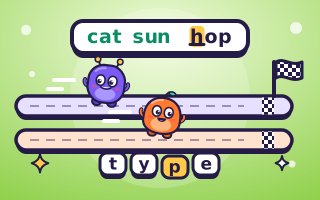
- Type the text from the first letter to the last. The next letter to type is lit up in yellow, and every letter you get right turns green.
- A wrong key turns the letter red, and you stay on it until you type the right one. You never need Backspace: just press the right key. Each wrong key costs you a moment and lowers your accuracy.
- Every right letter moves your buddy along the track, so you can always see who's ahead.
- The first to type the whole text wins the race. The race ends right there, and both players see how fast and how accurately they typed.
- The first player to win 2 races (or 3 in best of 5) wins the match. Each race has a new text, and both players always type the same one.
Two players on one device
There are two ways to race a friend, and the game asks which one you want when you press 2 Players.
- Race at the same time (phones and tablets): the screen splits in two and each player gets their own text and their own keys. On a phone held upright, the top half turns round to face the player sitting opposite. On a wider screen, the halves sit side by side. Both of you type at once, and the first to finish wins.
- Take turns on one keyboard (computers): a computer has only one keyboard, so one player types the text first while the game records every key. Then the other player types the same text while a replay of the first player's run races them on the track. If you finish before the replay does, you win the race. The player who goes first changes every race.
The game suggests the way that suits your device and remembers what you chose last time.
What you can type
| Text | What comes up | Example |
|---|---|---|
| Easy words | Short words a young child knows, about 7 in a race | frog kite sun milk jump red bell |
| Common words | Everyday words from books and letters, about 8 in a race | water story never friend light open |
| Sentences | Short, friendly sentences written for this game, with capitals, commas, apostrophes, full stops and question marks | Seven ducks swam in a line across the still pond. |
| Numbers | Groups of one to four digits, about 8 in a race | 482 17 9036 5 210 |
Every word is spelled the same way in American and British English, so there's only one right way to type it. Words and sentences don't come round again until many others have.
Controls
| Device | How to type |
|---|---|
| Phone or tablet | Tap the big keys on the screen. The key for the next letter glows. |
| Computer | Type on your own keyboard. The keys on the screen light up as a guide, and you can click them too. |
| Taking turns | Press Start, Enter or Space when it's your turn, then type. |
Capital letters: on the screen's keys, tap the letter and it comes out as a capital when the text needs one, just as a phone does at the start of a sentence. On a real keyboard, hold Shift as you normally would, and the game reminds you if you forget. The game reads the letter your keyboard actually types, so it works with any keyboard layout. The keys on the screen are laid out like an English QWERTY keyboard.
How speed and accuracy are measured
Speed is in words a minute (wpm). Typing tests count every five characters as one word, spaces included, so that long and short words count fairly. The clock starts at Go! and stops when you type the last letter. A text of 40 characters is 8 "words", so typing it in 30 seconds is 16 words a minute. Your speed shows live next to your lane and again at the end of each race.
Accuracy is the share of your key presses that were right. If you press 50 keys and 2 of them are wrong, your accuracy is 96%. Because a wrong key doesn't move you on, every slip slows you down, so careful typing usually wins.
Computer levels
The computer types the same text as you, one key at a time, with a person's rhythm: a short pause before each new word, a little slower on capitals, digits and punctuation, and the odd wrong key that it has to fix. It doesn't start until a moment after Go!.
| Level | Speed on common words | Wrong keys |
|---|---|---|
| Easy | About 10 words a minute | About 1 key in 16 |
| Medium | About 20 words a minute | About 1 key in 25 |
| Hard | About 35 words a minute | About 1 key in 45 |
| Expert | About 60 words a minute | About 1 key in 90 |
Easy is a fair race for a child who is just learning where the letters are. Expert takes real speed to beat, even on a real keyboard. Numbers and sentences slow the computer down a little, just as they slow people down.
Touch typing tips
- Start from the home row. Rest your left fingers on A S D F and your right fingers on J K L and the key next to it, with your thumbs on the space bar. Each finger reaches for the keys above and below its home key, then goes back.
- Feel for the bumps. Most keyboards have a small bump on F and J, so your index fingers can find the home row without looking.
- Keep your eyes on the screen. Looking down at your hands costs time at every word. Trust your fingers, and use the glowing key on the screen if you get lost.
- Be accurate first. In Typing Race a wrong key always costs time, so a steady rhythm beats rushing and fixing.
- Read ahead. While your fingers type one word, let your eyes move on to the next.
- Practise little and often. A few races a day build speed faster than one long session.
On a phone or tablet, use both thumbs or a finger from each hand, and keep the device flat on a table when two of you share it.
For parents and teachers
Typing Race turns keyboarding practice into a friendly contest. Children see their speed and accuracy after every race, and the race track shows progress at a glance, which keeps even slow typists going to the finish. Easy words suit children who are learning letter positions, Common words build fluency with the words they read every day, and Sentences add capital letters and punctuation. Numbers practise the top row of the keyboard.
Two children can race on one tablet at the same time, or take turns at a classroom computer. Against the computer, a child can start on Easy and move up a level once they win. There's no sign-up, nothing to install and no ads during a game. See our page for parents and teachers for more games that suit school.
Questions
Is Typing Race free?
Yes. It's free in your browser, with no download, no sign-up and no ads during a game.
Can two people play on one device?
Yes. On a phone or tablet, choose Race at the same time: the screen splits in two and each of you types on your own keys. On a computer with one keyboard, choose Take turns on one keyboard: one types first, then the other races a replay of their run.
Do I need to press Backspace?
No. A wrong key turns the letter red, and you simply type the right key to go on. The mistake still counts against your accuracy, and the time it took still counts against your speed.
How is typing speed measured?
In words a minute. Every five characters you type, spaces included, count as one word, and the clock runs from Go! until your last letter.
Which text is best for young children?
Easy words: short words such as cat, frog and kite, about 7 in a race. Against the computer, start on Easy.
Why does it want a capital letter?
Sentences start with a capital. On a real keyboard, hold Shift while you press the letter. On the screen's keys you don't need to: the letter comes out as a capital by itself.
Does the computer cheat?
No. It types the same text as you at the speed of its level, and it makes mistakes and has to fix them, just like a person.
Updated 11 November 2026